Maximize Your Laptop's Connectivity: Rosonway's 7-Port USB-C Hub with 10Gbps Speed
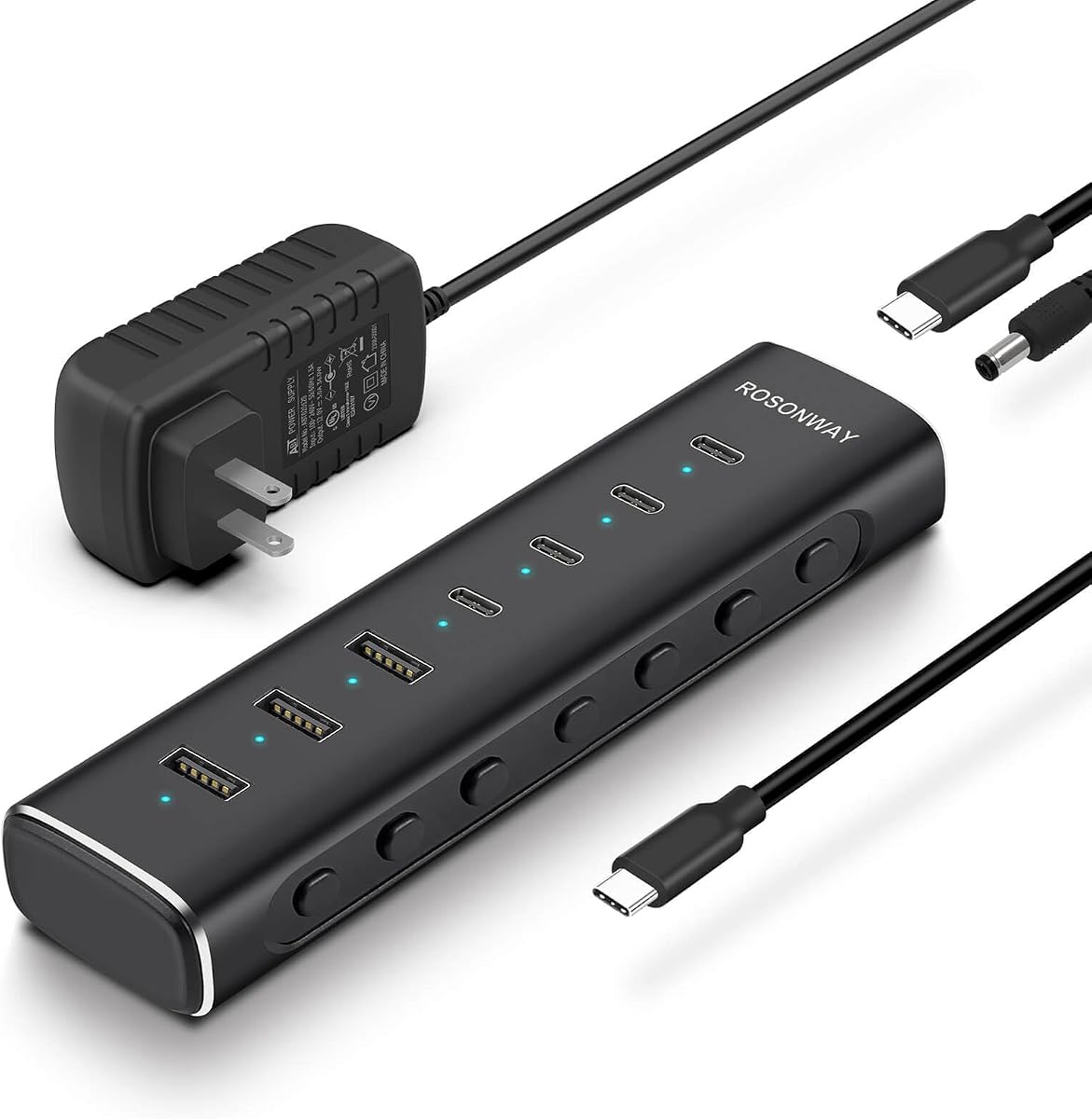
When your modern laptop’s limited ports leave you juggling dongles, a powered hub like the Rosonway RSH-H7C4 can be a game-changer. This hub uniquely prioritizes USB-C connectivity with four USB-C 3.2 ports alongside three USB-A 3.2 ports, all running at a full 10Gbps—ideal for creative professionals or power users with newer peripherals. Before buying, understand that not all USB-C ports are equal; this hub’s configuration is specifically tailored for USB-C-centric workflows.
Key Considerations Before Buying
- Power delivery is critical: With a 36W (12V/3A) adapter, this hub provides enough juice for bus-powered devices like external SSDs, but it cannot charge your laptop—check if your device supports power delivery separately.
- Cable length matters: The 3.3ft (1m) attached cable offers flexibility for desktop setups but may be short for users who need to reach a distant port on a tower PC or across a large desk.
- Port selection is specialized: If you rely heavily on legacy USB-A devices, the 3 USB-A ports may suffice, but this hub is clearly designed for those transitioning to USB-C peripherals like monitors or high-speed drives.
What Our Analysts Recommend
For a powered hub, verify that the included power adapter matches your region's voltage standards and that the hub supports your specific data transfer needs—10Gbps is excellent for video editing or large file transfers. Also, check for aluminum construction, which aids heat dissipation and durability, as seen in this Rosonway model.
USB Hubs Market Context
Market Overview
The USB hub market is rapidly evolving with the shift to USB-C, but many hubs still rely on older USB 3.0 (5Gbps) standards. The Rosonway RSH-H7C4 stands out by offering full USB 3.2 Gen 2 speeds across all ports, a rarity in this price range, catering to users with high-bandwidth devices like 4K webcams or NVMe SSDs.
Common Issues
A frequent problem with USB hubs is insufficient power delivery, causing devices to disconnect or slow down—this is why the included 36W adapter is a key differentiator. Another issue is compatibility: some hubs fail to support USB-C monitors or require specific drivers, but this model uses standard protocols for broad device support.
Quality Indicators
Look for hubs with metal enclosures (like this aluminum model) for better heat management and longevity. Also, check for independent port controllers—this hub's ability to maintain 10Gbps on all ports simultaneously suggests robust internal design, avoiding the common bottleneck of shared bandwidth.
Review Authenticity Insights
Grade B Interpretation
With a Review Authenticity Grade of B and an estimated 10% fake review rate, the Rosonway hub's feedback is largely trustworthy but warrants caution. The 4.89 rating is slightly inflated, and the adjusted 4.60 is more realistic, indicating a solid product with minor flaws that genuine reviewers note.
Trust Recommendation
Focus on the 90% of reviews that are likely authentic—particularly those mentioning specific use cases like connecting multiple SSDs or running a dual-monitor setup. The balanced critiques (e.g., cable length or port spacing) are more reliable than gushing five-star claims.
Tips for Reading Reviews
When reading USB hub reviews, prioritize verified purchasers who describe their device ecosystem (e.g., 'MacBook Pro M2' or 'Windows 11 desktop') and test speeds with real tools. Be skeptical of reviews that lack technical detail or only praise performance without mentioning any trade-offs.
Expert Perspective
The Rosonway RSH-H7C4 is a well-executed USB hub that fills a niche for USB-C power users, offering rare 10Gbps speeds across all ports and a robust power adapter. Its aluminum build and 4 USB-C ports cater to modern laptops, but the fixed cable and lack of laptop charging limit its versatility. The authenticity analysis suggests a genuinely high-quality product, with a 4.60 adjusted rating reflecting strong real-world satisfaction.
Purchase Considerations
Weigh your need for USB-C ports versus USB-A: if most of your peripherals are still USB-A (e.g., mice, keyboards), this hub may leave you with unused ports. Also, consider your desk layout—the 3.3ft cable is adequate for a laptop next to your workspace but may be restrictive for a tower PC on the floor.
Comparing Alternatives
Shoppers should compare this hub with models offering integrated charging (e.g., 100W PD pass-through) if they need to power a laptop, or with hubs featuring longer detachable cables for greater placement flexibility.