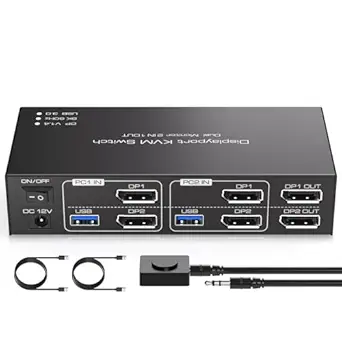
Master Dual-Monitor Workflows: Choosing a 4K@60Hz KVM Switch for Two Computers
When you're juggling a work PC and a personal computer across two monitors, a dual-monitor KVM switch like this one is a game-changer. This specific model supports 4K@60Hz resolution, ensuring crisp visuals for both screens, and includes four USB 3.0 ports for sharing peripherals like a keyboard, mouse, and printer. Before buying, focus on how the switch handles video bandwidth and peripheral latency, as these directly impact your daily efficiency.
Key Considerations Before Buying
- Resolution and refresh rate: This switch supports 4K@60Hz, which is ideal for modern monitors, but verify that your monitors and cables are HDMI 2.0-compatible to avoid signal degradation or dropped frames.
- USB port versatility: With four USB 3.0 ports, you can share high-speed devices like external drives or a webcam. Ensure the switch provides enough power for bus-powered gadgets, as some KVMs struggle with higher-draw peripherals.
- Switching method: This model includes a physical controller, which is more reliable than software-based switching. Look for hotkey or button-based switching that doesn't require driver installation for seamless transitions between computers.
What Our Analysts Recommend
Quality KVM switches in this category should offer EDID emulation to maintain monitor settings when switching sources, preventing desktop icon reshuffling. Also, check for USB 3.0 data transfer rates (up to 5Gbps) and support for multiple input formats like HDMI 2.0. A sturdy build and clear labeling on ports indicate attention to detail.
KVM Switches Market Context
Market Overview
The dual-monitor KVM switch market has grown with the rise of remote and hybrid work, as users need to toggle between work and personal setups without cable chaos. 4K@60Hz support is now standard, but many budget switches struggle with consistent performance at higher resolutions. This product targets professionals and power users who value crisp visuals and peripheral sharing.
Common Issues
Common problems include signal interference when switching between computers, especially at 4K@60Hz, which can cause flickering or black screens. Some users report USB ports failing to recognize devices after multiple switches, or the controller becoming unresponsive. Another issue is inadequate EDID emulation, leading to monitor resetting when switching inputs.
Quality Indicators
High-quality KVM switches feature metal enclosures for better heat dissipation and shielding against electromagnetic interference. Look for models with independent chipset controllers for each port, which reduce latency. Verified user reviews that mention specific use cases—like gaming or video editing—are strong indicators of real-world performance.
Review Authenticity Insights
Grade A Interpretation
With a Review Authenticity Grade of A and an estimated fake review percentage of just 5.00%, this product's reviews are highly trustworthy. This means the 4.67/5 star rating (adjusted to 4.60/5) largely reflects genuine user experiences, not manipulated scores. The low fake rate suggests the seller hasn't engaged in review padding, which is common in this category.
Trust Recommendation
Given the strong authenticity signals, you can rely on the positive feedback about this switch's performance, especially for dual-monitor setups and USB 3.0 speed. However, always cross-check a few critical reviews to understand potential drawbacks, like compatibility with specific monitors or operating systems. The high rating suggests it's a safe bet for most users.
Tips for Reading Reviews
Focus on reviews that mention the specific resolution (4K@60Hz) and dual-monitor configuration, as these directly test the product's core features. Look for detailed feedback on switching speed and USB device recognition, as these are common pain points. Also, note any reviews from users with similar setups to yours—like Mac and Windows mixed environments—to gauge compatibility.
Expert Perspective
This HDMI KVM switch stands out for its strong authenticity profile and high user satisfaction, with a 4.60/5 adjusted rating reflecting genuine praise for its 4K@60Hz dual-monitor support and USB 3.0 hub functionality. The inclusion of a physical controller adds reliability over software-based alternatives, and the low fake review rate boosts confidence in the feedback. However, with only 21 reviews, the sample size is small, so early adopters should verify compatibility with their specific monitors and peripherals. Overall, it's a solid choice for professionals needing a clean, efficient dual-computer setup.
Purchase Considerations
Weigh the price against alternatives that may offer additional ports or HDMI 2.1 support for future-proofing. If you rely on high-refresh-rate gaming or 4K at 120Hz, this switch won't meet those needs, as it's capped at 60Hz. For typical office work, video editing, or programming, the feature set is well-aligned with common requirements.
Comparing Alternatives
Shoppers should compare this with other dual-monitor KVM switches from brands like TESmart or IOGEAR, which offer similar specs but may have more reviews or broader compatibility. Look for models with EDID emulation and USB-C connectivity if you use modern laptops.