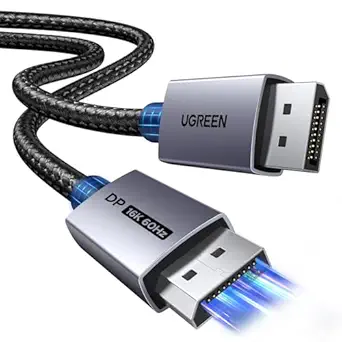
Unlocking 8K: What to Know Before Buying a USB-C to DisplayPort 1.4 Cable
A USB-C to DisplayPort 1.4 cable like this 6FT model promises to turn your laptop into a high-refresh-rate gaming rig or an 8K workstation. But not all USB-C ports are created equal, and the cable itself must meet strict standards to handle 8K@60Hz or 4K@240Hz without signal loss. Before you buy, understand the compatibility and bandwidth requirements that separate a flawless connection from a flickering screen.
Key Considerations Before Buying
- Check that your laptop’s USB-C port supports DisplayPort Alt Mode (DP Alt Mode). Without it, the cable won’t transmit video—many budget laptops and older phones lack this feature.
- Bandwidth matters: DisplayPort 1.4 supports up to 32.4 Gbps, enough for 8K@60Hz with DSC or 4K@240Hz. Ensure your GPU and monitor also support these resolutions and refresh rates to avoid bottlenecks.
- Cable length affects signal integrity. At 6FT, this cable should maintain full bandwidth, but longer passive cables may require lower resolutions. Look for active cables if you need runs over 10 feet.
What Our Analysts Recommend
Prioritize cables with explicit certification for DisplayPort 1.4 and USB-C compliance, such as VESA or USB-IF logos. Check for gold-plated connectors and triple shielding to minimize interference, especially for high-refresh-rate gaming. Reviews mentioning durability and consistent performance at max specs are strong quality indicators.
DisplayPort Cables Market Context
Market Overview
The USB-C to DisplayPort cable market is booming as laptops ditch proprietary ports for USB-C. However, many cables are marketed as '4K compatible' without specifying refresh rates or DP version, leading to confusion. DisplayPort 1.4 cables are increasingly common, but true 8K@60Hz support remains a premium feature.
Common Issues
A frequent complaint is cables that work at 4K@60Hz but fail at higher refresh rates or resolutions due to insufficient bandwidth or poor shielding. Another issue is incompatibility with certain laptops or monitors because the USB-C port doesn't support DP Alt Mode. Some users also report flimsy connectors that wear out quickly.
Quality Indicators
High-quality cables explicitly state support for DisplayPort 1.4, 8K@60Hz, and 4K@240Hz, and often include DSC (Display Stream Compression) for 8K. They feature robust strain relief, gold-plated contacts, and are backed by warranties. Certifications like VESA DP 1.4 ensure the cable meets industry standards.
Review Authenticity Insights
Grade B Interpretation
With a Grade B authenticity rating and an estimated 15% fake reviews, this product’s 4.89-star average is likely inflated. The adjusted rating of 4.50 suggests that while most reviews are genuine, a notable minority may be fabricated, so the true quality is still high but not perfect.
Trust Recommendation
Trust the adjusted rating of 4.50 over the raw 4.89. Focus on reviews that mention specific technical details, such as successful 4K@240Hz performance or compatibility with particular laptop models. Verified purchase reviews with balanced pros and cons are more reliable.
Tips for Reading Reviews
Look for reviews that discuss long-term durability and performance at maximum specs, as these are harder to fake. Be wary of generic praise like 'great cable' without context. Cross-reference multiple reviews to identify recurring issues or consistent praise.
Expert Perspective
This USB-C to DisplayPort 1.4 cable appears to be a solid choice for users needing high-bandwidth video output from a compatible laptop. The 6FT length is practical for most desk setups, and the specified 8K@60Hz and 4K@240Hz support positions it for future-proofing. However, the 15% fake review estimate means you should verify compatibility with your specific hardware before purchasing.
Purchase Considerations
Weigh the cable’s price against its certified capabilities and build quality. If you need reliable 4K@240Hz for gaming or 8K for professional work, ensure your laptop’s USB-C port supports DP Alt Mode and that your monitor matches the cable’s specs. Consider whether a shorter cable might offer better signal integrity if your setup allows.
Comparing Alternatives
Compare this cable with similar offerings from brands like Cable Matters or StarTech, which may offer longer warranties or additional certifications. Reading expert reviews and checking user forums can help identify the best fit for your specific devices.
![Silkland 80Gbps DisplayPort Cable 2.1 6.6FT/2M [VESA Certified], [8K@240Hz, 4K@540Hz 360Hz 240Hz] DP 2.1 Cable 16K, DP80 HDR DSC Display Port Cord Compatible FreeSync Gaming Monitor 5090 7900XTX,S1334](https://m.media-amazon.com/images/I/418Qa3n9TNL._AC_US120_SCLZZZZZZZ__.jpg)
![80Gbps DisplayPort Cable 2.1 6.6FT/2m, [VESA Certified UHBR20] 16K@60Hz, 8K@240Hz, 4K@540Hz 360Hz 240Hz, DP 2.1 Cable DP80 Braided Cord, FreeSync G-Sync HDR for Gaming Monitor RTX5090/5080 7900XTX](https://m.media-amazon.com/images/I/41Ma0hm6PhL._SX342_SY445_QL70_FMwebp_.jpg)