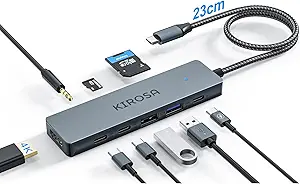
USB4 8-in-1 Hub: Dual 4K/8K Displays, 100W PD, 7 USB-C Ports
When your MacBook Pro or Windows ultrabook has only two or three USB-C ports, an 8-in-1 hub like this one becomes your command center. It's not just about adding ports—it's about maintaining high-speed data transfer (up to 10Gbps on the data ports) and driving dual 4K displays at 60Hz, which is essential for creative professionals and power users.
Key Considerations Before Buying
- Check your laptop's USB-C/Thunderbolt capabilities: This hub's USB4 ports can deliver full Thunderbolt 3/4 speeds, but if your device only supports USB 3.2 Gen 2, you won't see the same throughput. Verify your laptop's spec sheet before buying.
- Power delivery is a big deal: With 100W PD, this hub can charge a 16-inch MacBook Pro while running multiple peripherals. However, ensure your charger's wattage is sufficient and the hub supports the required PD profile—otherwise, you might see slow charging or power drops.
- Display output resolution and refresh rate: Dual 4K at 60Hz is ideal, but if you have a 6K or 8K monitor, check whether the hub supports that via a single port (yes, it does for 8K) and whether your laptop's GPU can handle it.
What Our Analysts Recommend
In a hub like this, look for solid build quality, adequate heat dissipation (since 100W PD and video output generate heat), and reliable chipset compatibility with both macOS and Windows. Also, confirm the number of USB4 ports (3 here) and data-only ports (4 at 10Gbps) meets your needs—more USB4 ports mean more flexibility for high-speed devices like external SSDs.
USB Hubs Market Context
Market Overview
The USB-C hub market has exploded with the adoption of USB4 and Thunderbolt 3/4 in modern laptops. Consumers now expect more than just basic port expansion—they want multi-display support, high-speed data, and power delivery in a single compact device.
Common Issues
Many hubs fail to deliver advertised speeds or display resolutions due to bandwidth limitations or poor chipset implementation. Others overheat under load, causing disconnections. Additionally, compatibility issues with Apple Silicon (M1/M2/M3) and Windows sleep/wake cycles are frequent complaints.
Quality Indicators
For USB4/Thunderbolt hubs, look for certified chipsets (e.g., Intel Goshen Ridge or similar), aluminum construction for heat dissipation, and clear marketing that specifies per-port bandwidth. Also, a hub that supports both macOS and Windows without driver hassles is a sign of mature design.
Review Authenticity Insights
Grade B Interpretation
With a Grade B and an estimated 10% fake review percentage, this hub's review profile is mostly authentic but has a small number of suspicious reviews. The adjusted rating of 4.30/5 (down from 4.50) suggests that a few possibly incentivized or unverified reviews may be inflating the score slightly.
Trust Recommendation
Given the relatively low fake rate, you can trust the general sentiment of the reviews, but it's wise to read the detailed ones—especially those that mention specific use cases like 'dual monitor with M1' or 'PD charging with a 16-inch MacBook Pro.' Look for reviewers who provide technical specs and admit limitations.
Tips for Reading Reviews
For this type of product, focus on reviews that describe real-world performance with the exact laptop model you own. Check for mentions of heat, connection stability, and whether the hub works when plugged into a USB-C port that isn't Thunderbolt. Also, be wary of overly short, generic 5-star reviews—they might be part of the 10% fake rate.
Expert Perspective
This 8-in-1 USB4 hub is a solid choice for users who need a versatile port expansion solution with dual 4K/8K display output and high-speed data transfer. The inclusion of three USB4 ports is future-proof and aligns with the latest MacBook Pro/Air and Windows laptops. However, the small sample of reviews (2) and the 10% fake rate mean you should rely more on the technical specs and your own compatibility checks than on user feedback.
Purchase Considerations
Weigh the price against the features: if you only need one 4K display and basic data ports, a cheaper USB-C hub might suffice. But if you're a creative professional with a dual-monitor setup and require 100W PD, this hub offers a compelling package. Also, consider the warranty and return policy—since it's a niche product, you'll want a safety net.
Comparing Alternatives
Compare this hub with other USB4/Thunderbolt docks from brands like CalDigit, Anker, or Plugable, which often have a longer track record and more extensive reviews. But if you're looking for a compact, port-rich solution specifically for USB-C laptops, this one is worth considering.