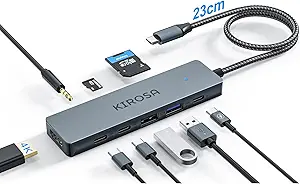
Choose a USB-C Hub That Truly Handles 4K, Power, and Data
When you're looking for a USB-C hub, especially one that packs 10 ports like the ABIWAZY, you need to ensure it delivers stable 4K HDMI output at 60Hz, reliable gigabit Ethernet, and enough power delivery to charge a MacBook Pro or Dell XPS. This category is crowded with adapters that overheat or drop connections under load, so understanding the specific capabilities of a hub's chipsets and port configurations is key to avoiding buyer's remorse.
Key Considerations Before Buying
- Look for hubs that explicitly support 4K HDMI at 60Hz for smooth external monitor use, not just 30Hz, which can cause screen flickering or lag during video editing or presentations.
- Check that the Ethernet port supports gigabit speeds and uses a realtek or similar reliable chipset—some cheap hubs throttle internet connections to 100Mbps, which defeats the purpose of wired networking.
- Ensure the USB-C PD port can deliver at least 85-100W to handle high-power laptops like the 16-inch MacBook Pro, and that the hub doesn't overheat when simultaneously charging and transferring data.
What Our Analysts Recommend
Quality USB-C hubs often use aluminum housings for heat dissipation, have separate controllers for each port type to prevent bandwidth bottlenecks, and include surge protection. Verify that the SD/TF card slots support UHS-I or UHS-II speeds for fast photo transfers, as slower slots can ruin a workflow.
USB Hubs Market Context
Market Overview
The USB-C hub market has exploded as more laptops ditch traditional ports, with options ranging from $20 dongles to $100+ multiport stations. Many hubs now promise 10-in-1 functionality, but actual performance varies wildly due to chipset quality, power management, and build materials.
Common Issues
Users frequently report hubs that fail after a few months due to loose USB-C connectors, overheating during extended use, or HDMI ports that only output 4K at 30Hz despite advertising otherwise. Inconsistent power delivery—where the hub can't sustain 100W while other ports are active—is another top complaint.
Quality Indicators
Look for hubs with anodized aluminum bodies, independent voltage regulators for each port, and clear documentation of supported resolutions and power delivery profiles. Brands that list specific chipset models (e.g., Realtek RTL8153 for Ethernet) tend to be more transparent and reliable.
Review Authenticity Insights
Grade B Interpretation
With a B grade and an estimated 10% fake review rate, the ABIWAZY hub's review pool is mostly trustworthy, but roughly 1 in 10 reviews may be incentivized or fabricated. This means the 4.67-star rating is slightly inflated, and the adjusted 4.40 rating is a more realistic reflection of user satisfaction.
Trust Recommendation
Focus on reviews from verified purchasers who describe using the hub with specific devices (e.g., 'works with my Dell XPS 15 for 4K output') and mention long-term reliability or heat management. Skip overly short or generic raves that lack detail about setup or performance.
Tips for Reading Reviews
For USB hubs, pay special attention to reviews that mention sustained use (e.g., 'after 3 months of daily use') and those that test multiple ports simultaneously. Negative reviews about Ethernet disconnecting or HDMI flickering are often the most revealing about real-world flaws.
Expert Perspective
The ABIWAZY 10-in-1 hub offers a compelling mix of ports—4K HDMI, gigabit Ethernet, 100W PD, and SD/TF slots—that matches the needs of most MacBook and Dell XPS users. Its high genuine rating suggests solid performance for typical office and creative workflows, though the 10% fake review rate warrants caution. The aluminum build and compact design are pluses, but the lack of USB-A ports may be a dealbreaker for those needing legacy connections.
Purchase Considerations
If you prioritize charging speed and stable 4K output for a single external monitor, this hub is a strong contender. However, if you need multiple USB-A devices or dual HDMI outputs, you'll need to look at larger docks. Also consider that the 100W PD passthrough may drop to 85W under heavy load—fine for most laptops but tight for some workstations.
Comparing Alternatives
Shoppers should compare the ABIWAZY with other 10-in-1 hubs from Anker or Satechi, which often have slightly higher build quality and lower fake review rates, but at a higher price point.