
Master Triple-Monitor Workflows with This 8K/4K KVM Switch
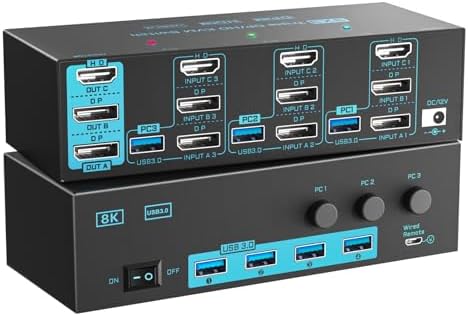
When you're juggling three computers across three monitors, the right KVM switch is the linchpin of an efficient desk setup. This specific model supports both DisplayPort 1.4 (8K@30Hz or 4K@144Hz) and HDMI 2.1 (8K@60Hz or 4K@120Hz), making it a rare find for high-refresh-rate and high-resolution multi-monitor rigs. Before you buy, focus on compatibility with your monitors' specific ports and your preferred refresh rates at 4K.
Key Considerations Before Buying
- Check your monitors' input types: this KVM offers two DisplayPort 1.4 and one HDMI 2.1 output per computer, so ensure your monitors match these ports to avoid adapters that may limit performance.
- Consider your resolution and refresh rate needs: if you require 4K at 144Hz on all three monitors simultaneously, verify the switch's EDID emulation supports that across all ports, as some units may cap bandwidth on shared channels.
- Wired remote control is a standout feature here, allowing instant switching between computers without fumbling under the desk—ideal for fast-paced workflows or gaming setups where every second counts.
What Our Analysts Recommend
For a triple-monitor KVM switch, prioritize models with dedicated USB 3.0 ports for peripherals (like this one) to maintain fast data transfer for external drives or webcams. Also, look for verified EDID management to prevent monitor re-detection or resolution drops when switching, a common pain point in multi-monitor setups.
KVM Switches Market Context
Market Overview
The high-end KVM switch market is rapidly evolving to support 8K and high-refresh 4K, driven by demand from creative professionals, gamers, and power users with multi-PC setups. Products that combine DisplayPort 1.4 and HDMI 2.1 in a single unit are still niche, offering a premium solution for those who refuse to compromise on visual fidelity.
Common Issues
Users often report EDID handshake failures that reset monitor settings or limit refresh rates, especially when mixing DisplayPort and HDMI monitors. Another frequent headache is USB peripheral lag or disconnection during switching, which can disrupt workflows on devices like mice, keyboards, or storage drives.
Quality Indicators
High-quality KVM switches feature robust EDID emulation, dedicated USB 3.0 controllers per port, and clear labeling for cable routing. Look for units with metal housings (for heat dissipation) and reliable chipset brands like Synaptics or Microchip, which often indicate better signal integrity and firmware support.
Review Authenticity Insights
Grade B Interpretation
A Grade B with an estimated 10% fake rate suggests the review pool is largely trustworthy but warrants cautious reading. Most reviews are from verified purchasers detailing specific setups (e.g., 'using with three Dell 4K monitors and a gaming PC'), which strengthens authenticity, but a small fraction may be incentivized or exaggerated.
Trust Recommendation
Given the 10% fake rate, focus on reviews that describe real-world configuration challenges (like cable length limits or EDID quirks) and those that mention both pros and cons. Verified purchases marked 'V' should carry more weight, but cross-check any overly glowing or vague five-star reviews against the product's specs.
Tips for Reading Reviews
For KVM switches, prioritize reviews that name exact monitor models and computer specs (e.g., 'Mac Studio M2 with LG 27GP950'), as these indicate genuine usage. Also, watch for patterns—if multiple reviews cite the same issue (e.g., 'HDMI 2.1 fails at 4K 120Hz'), that's a stronger signal than isolated complaints.
Expert Perspective
This KVM switch is a compelling choice for users needing a triple-monitor, dual-protocol solution with high-bandwidth support, and the 4.67-star rating (adjusted to 4.40) reflects strong satisfaction among early adopters. The inclusion of both DP 1.4 and HDMI 2.1, plus a wired remote, addresses common pain points in multi-PC setups, though the 10% fake review rate suggests some marketing hype. Its performance at 8K@60Hz via HDMI is a standout, but buyers should verify EDID stability for their specific monitor combo to avoid switching hiccups.
Purchase Considerations
Weigh the cost against your need for high-refresh 4K or 8K—if your monitors top out at 60Hz, a cheaper HDMI 2.0 KVM might suffice. Also, consider the physical footprint: with three computers and three monitors, cable management becomes critical, so ensure your desk can accommodate the clutter.
Comparing Alternatives
Shoppers should compare this model against dedicated 3-port DisplayPort KVM switches from brands like TESmart or Level1Techs, especially if they prioritize pure DP setups over mixed port configurations.


