
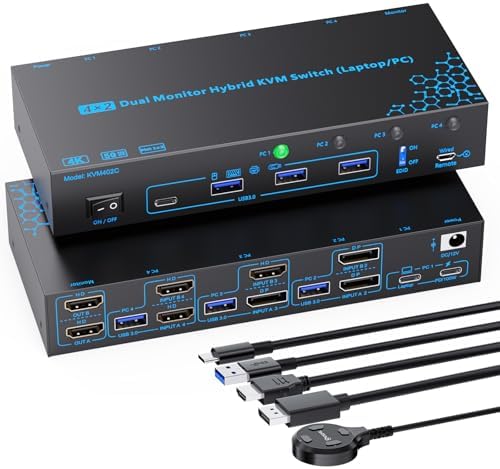
Mastering Multi-Computer Workflows: Your Guide to 4-Port Hybrid KVM Switches
If you're juggling two monitors across four computers—like a mix of laptops and desktops—this 4-port hybrid KVM switch with USB-C docking and dual HDMI/DisplayPort outputs is designed to streamline your setup. It supports 4K@60Hz on both screens and includes an EDID emulator to prevent display dropouts, making it a robust choice for power users. Before buying, focus on compatibility with your devices' video outputs (e.g., USB-C, HDMI, DisplayPort) and the 100W PD charging capability to ensure your laptop stays powered.
Key Considerations Before Buying
- Check your monitors' input types: This switch supports dual HDMI and dual DisplayPort, but you'll need to match your monitors' ports or use adapters for seamless 4K@60Hz performance.
- Consider the EDID emulator feature: It's crucial for maintaining consistent display settings when switching between computers, preventing Windows from rearranging your desktop icons or resolution.
- Evaluate the 100W PD charging: If you rely on a single USB-C cable for both data and power to your laptop, ensure your laptop's charging requirements don't exceed this limit, as some high-performance models may need more.
What Our Analysts Recommend
Quality hybrid KVM switches should offer reliable EDID emulation to avoid screen flickering, support for the latest video standards (HDMI 2.0 or DisplayPort 1.4 for 4K@60Hz), and robust USB-C connectivity with sufficient power delivery. Look for models with clear labeling and independent peripheral switching to avoid input lag or disconnections.
KVM Switches Market Context
Market Overview
The KVM switch market has evolved rapidly with the rise of USB-C laptops and multi-monitor setups, now offering hybrid models that blend traditional video ports with modern docking capabilities. This 4-port, dual-monitor switch targets professionals and gamers who need seamless control across multiple systems without cable clutter.
Common Issues
Users often face EDID handshake problems, where monitors lose signal or resolution on switch, or USB-C power delivery that's insufficient for laptops under heavy load. Another pain point is limited peripheral support—some switches don't handle high-polling-rate gaming mice or external drives reliably.
Quality Indicators
A reliable KVM switch includes an EDID emulator for consistent display behavior, independent USB hub ports for peripherals, and support for high-bandwidth video standards like HDMI 2.0. Build quality, such as shielded cables and solid metal casing, also reduces interference and extends lifespan.
Review Authenticity Insights
Grade B Interpretation
With a Grade B and an estimated 10% fake review rate, this product's review authenticity is good but not perfect—most feedback is genuine, though a small portion may be incentivized or fabricated. The 4.44 average rating (adjusted to 4.20) suggests real users are generally satisfied, but the slight drop indicates some exaggerated positive reviews.
Trust Recommendation
You can trust the majority of reviews here, especially those with detailed setup descriptions or specific use cases (e.g., 'works with my M1 MacBook and dual monitors'). Focus on verified purchase reviews and be skeptical of overly brief 5-star ratings without technical context, as they may be from the fake 10%.
Tips for Reading Reviews
For KVM switches, look for reviews that mention exact monitor models, cable types, and operating systems—these signal real-world testing. Ignore complaints about 'didn't work' without details, as they may stem from user error, and prioritize reviews that address EDID emulation or PD charging performance.
Expert Perspective
This 4-port hybrid KVM switch stands out for its dual-monitor support at 4K@60Hz and integrated 100W PD charging, making it a strong contender for users with mixed laptop/desktop setups. The EDID emulator is a key differentiator that addresses a common pain point in multi-computer environments, though the 10% fake review rate warrants cautious optimism. Based on the adjusted 4.20 rating and mostly genuine feedback, it offers solid value for its feature set, especially if you need USB-C docking convenience.
Purchase Considerations
Weigh the need for four computer inputs against your actual usage—if you only switch between two, a simpler model might suffice. Also, verify that your monitors support the included ports (e.g., Dual DisplayPort or HDMI) to avoid adapter costs, and consider if the 100W PD meets your laptop's charging demands under full load.
Comparing Alternatives
Compare this model with dedicated USB-C docking stations or single-monitor KVM switches if you don't need dual 4K@60Hz output, as simpler setups may offer lower latency or more reliable EDID handling.


