Charge and Play AR Glasses: What to Know Before Buying
If you own AR glasses like the Viture, Rokid, Xreal, or RayNeo, you've likely faced the dilemma of needing to charge your device while using the glasses for extended sessions. This USB-C adapter is designed specifically to solve that problem by combining 100W power delivery with 4K@60Hz video passthrough, making it a versatile tool for gaming on the Steam Deck, Switch, or connecting to a laptop.
Key Considerations Before Buying
- Ensure the adapter supports the exact power delivery (PD) protocol your device needs; this model offers 100W PD, which is ample for most laptops and handhelds, but verify your device's wattage requirements to avoid underpowering.
- Check compatibility with your AR glasses model and host device. This adapter is marketed for Viture, Rokid, Xreal, and RayNeo glasses, but not all glasses may negotiate video passthrough correctly—look for user reports on specific combos.
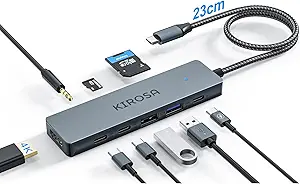
- Consider the cable length and form factor. A short, rigid adapter can be awkward when connected to a headset or handheld, so assess whether the physical design will suit your typical setup (e.g., desk vs. couch use).
What Our Analysts Recommend
Quality indicators for this type of adapter include robust build materials (e.g., braided cable or reinforced connectors) to withstand frequent plugging/unplugging, and clear support for DisplayPort Alt Mode for video. Also, check for independent certification like USB-IF compliance, which signals reliable power and data handling.
USB Hubs Market Context
Market Overview
The market for USB-C adapters that combine high-power charging with video passthrough has grown rapidly alongside AR glasses and handheld gaming devices. These niche adapters fill a gap left by standard hubs, which often lack dedicated support for AR glasses' unique power and video needs.
Common Issues
Common problems include intermittent video signal dropouts, especially when the adapter is moved or jostled, and compatibility woes with certain device-glasses pairings. Some adapters also fail to deliver full 100W charging while simultaneously handling 4K video, leading to slow charging or display flicker.
Quality Indicators
Quality products in this category typically feature gold-plated connectors for reliable signal integrity, a compact yet sturdy housing that doesn't block adjacent ports, and clear labeling of supported video resolutions and power profiles. Look for adapters with a dedicated chipset for handling both power and data streams without crossover interference.
Review Authenticity Insights
Grade B Interpretation
A Grade B authenticity rating with an estimated 10% fake review rate suggests that the vast majority of feedback is genuine, but a small minority may be incentivized or fabricated. This is a moderate risk level—most reviews are trustworthy, but you should still cross-check critical claims.
Trust Recommendation
Given the 4.44 average rating (adjusted to 4.20 after filtering suspicious reviews), you can generally trust the positive consensus, but focus on reviews that detail specific use cases (e.g., 'Works with Xreal Air and Steam Deck at 60Hz'). Verified purchase badges and multi-paragraph experiences are strong signals of authenticity.
Tips for Reading Reviews
When reading reviews for this adapter, prioritize those that mention exact device pairings and any troubleshooting steps. Be wary of one-line raves that lack technical specifics, as they may be from incentivized testers. Also, note any reviews reporting issues with the Switch (this adapter explicitly does not support Switch 2) to confirm compatibility.
Expert Perspective
This USB-C adapter addresses a genuine pain point for AR glasses users who want to extend playtime without interrupting their experience. The combination of 100W PD and 4K@60Hz output is technically sound, and the compatibility list covers major AR brands and host devices. However, the authenticity analysis suggests a 10% chance of fake reviews, so while the product is likely solid, you should verify specific use-case reports. The adjusted rating of 4.20 out of 5 indicates that real users generally find it effective, but not flawless.
Purchase Considerations
Before buying, confirm that your specific AR glasses model and host device (like a MacBook or Steam Deck) are among those tested by reviewers. Also, consider whether you need the full 100W charging—if you're only powering a phone or Switch, a lower-wattage adapter might suffice at a lower cost.
Comparing Alternatives
Shoppers should compare this adapter with dedicated AR glasses cables from brands like Viture or Rokid, which may offer better ergonomics but limited power delivery. Also, consider general USB-C hubs with PD and video output, though they may not guarantee AR glasses compatibility.