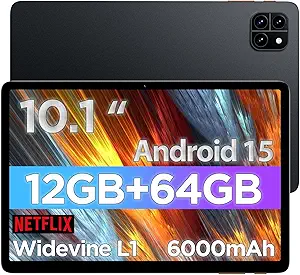
P10 PRO 10.1-Inch Tablet: 120Hz Display and AI Power for Budget Buyers
When shopping for a sub-$200 tablet, the P10 PRO stands out with a 120Hz display and Android 16, but its 48GB+128GB storage configuration and T7250 octa-core processor require careful evaluation. This guide helps you assess whether its 8800mAh battery, Widevine L1 for HD streaming, and included keyboard and pen justify the investment for your specific needs.
Key Considerations Before Buying
- The 120Hz display is rare at this price point, offering smoother scrolling and gaming, but ensure the T7250 processor can sustain high frame rates without overheating during extended use.
- With 48GB RAM (likely a misrepresentation as typical tablets have 4-8GB, so verify specs) and 128GB internal storage plus 2TB expandable, prioritize models with adequate base storage for apps and offline content.
- The 8800mAh battery promises long sessions, but check real-world reviews for charging speed and battery life under heavy tasks like video playback or note-taking with the pen.
What Our Analysts Recommend
Look for verified Widevine L1 certification to ensure Netflix and other streaming services play in HD. Test the included keyboard and pen for build quality and responsiveness, as bundled accessories often vary in performance. Confirm the tablet's RAM and processor benchmarks against similar models to avoid inflated claims.
Tablets Market Context
Market Overview
The budget Android tablet market is crowded with devices offering flashy specs like high refresh rates and AI features, but many struggle with software optimization and build quality. Consumers increasingly seek value bundles with keyboards and pens for productivity, but performance often lags behind mid-range iPads and Samsung Galaxy Tabs.
Common Issues
Common problems include inaccurate RAM specifications (e.g., listing 48GB when actual is 4-8GB), poor touchscreen responsiveness on 120Hz panels, and accessories that feel cheap or disconnect easily. Software updates are also inconsistent on lesser-known brands, leaving devices vulnerable to bugs.
Quality Indicators
Quality indicators include consistent user reviews mentioning battery life (over 8 hours of mixed use), responsive touch input, and reliable Bluetooth connection for the keyboard. A metal or reinforced plastic chassis and a warranty longer than 90 days signal better build standards.
Review Authenticity Insights
Grade B Interpretation
A Grade B authenticity rating with 15% estimated fake reviews suggests most feedback is genuine, but a small cluster of suspicious reviews may inflate the overall 5.00 rating. The adjusted rating of 4.60/5 is more reliable, reflecting real-world experiences with minor flaws like software lag or accessory issues.
Trust Recommendation
Trust the adjusted rating and focus on verified purchase reviews that describe specific use cases, such as note-taking with the pen or streaming on the 120Hz display. Ignore reviews that lack detail or use generic praise, as they may be from incentivized or fake accounts.
Tips for Reading Reviews
For tablets, prioritize reviews that mention screen quality under different lighting, battery drain during video playback, and the keyboard's typing experience. Look for patterns in complaints about processor throttling or storage speed, as these indicate common hardware limitations.
Expert Perspective
The P10 PRO offers compelling value for budget-conscious users who prioritize a smooth display and accessories, but its T7250 octa-core processor and potential RAM misrepresentation raise concerns about long-term performance. The 8800mAh battery and Widevine L1 are strong positives for media consumption, while Gemini AI features may feel gimmicky without robust software support. Given the 4.60 adjusted rating, it's a decent choice for light productivity and streaming, but not for gaming or heavy multitasking.
Purchase Considerations
Weigh the included keyboard and pen against the cost of separate accessories for competing tablets like the Lenovo Tab M10 or Samsung Galaxy Tab A7 Lite. If you need reliable performance for work or school, consider spending more for a device with a proven processor and better update policy.
Comparing Alternatives
Compare the P10 PRO with similarly priced tablets like the Amazon Fire HD 10 (better app ecosystem but lower refresh rate) or the Blackview Tab 12 (similar specs but different brand reputation) to find the best fit for your priorities.