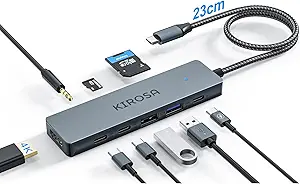
7-Port USB 3.0 Hub with Desk Clamp: What to Know Before Buying
A 7-port USB 3.0 hub with a desk clamp solves two problems at once: port scarcity and desk clutter. This model offers four USB-A and three USB-C ports at 5Gbps, so you can connect legacy and modern devices without reaching for adapters.
Key Considerations Before Buying
- Clamp compatibility: The desk clamp requires a flat edge with enough clearance—measure your desk thickness and lip depth to ensure a secure fit, especially if your desk has a beveled or curved edge.
- Power delivery: With seven ports, the hub needs a reliable power adapter to charge devices and maintain data speeds; check the included power supply's wattage and whether it can charge a laptop or tablet while transferring data.
- Port placement and cable management: The clamp design keeps ports within reach, but consider whether the fixed cable length (often 3–4 feet) is sufficient to reach your computer without strain.
What Our Analysts Recommend
Look for a hub with a sturdy metal clamp and reinforced cable joints, as plastic clamps can crack under pressure. Verify that the hub supports USB 3.0 (5Gbps) per port and includes overcurrent protection to prevent damage from power surges. A reputable brand with clear specifications and a warranty is a good sign.
USB Hubs Market Context
Market Overview
USB hubs have become essential as laptops and desktops ship with fewer ports, and the shift to USB-C has created demand for hubs that bridge old and new connectors. Clamp-style hubs are a niche but growing segment, appealing to users who want ports accessible without occupying desk space.
Common Issues
Many budget hubs suffer from insufficient power, causing devices to disconnect or charge slowly, especially when multiple ports are used. Data transfer speeds can also drop when the hub shares bandwidth across all ports, and some hubs run hot under load.
Quality Indicators
A quality hub will have a dedicated power input, clearly labeled ports, and a robust clamp mechanism. Look for reviews that mention long-term reliability and compatibility with high-draw devices like external drives. Certified products (e.g., USB-IF) are more likely to meet speed and safety standards.
Review Authenticity Insights
Grade A Interpretation
With an adjusted rating of 4.50/5 and an authenticity grade of A, this product's reviews are highly trustworthy. The estimated 8% fake reviews is low for the category, meaning the positive sentiment likely reflects real user experiences.
Trust Recommendation
You can rely on the overall rating, but still scan for reviews that describe your specific use case—such as connecting multiple drives or using the clamp on a particular desk type. The low fake review percentage suggests that even critical reviews are probably genuine.
Tips for Reading Reviews
Focus on reviews that mention durability over time and performance with power-hungry devices. Look for comments about clamp stability and whether the hub stays cool during extended use. Reviews with photos or detailed setups are especially helpful.
Expert Perspective
This 7-port hub with a desk clamp is a practical solution for users who need both USB-A and USB-C ports without sacrificing desk space. The 5Gbps speed is adequate for peripherals and external drives, though not for high-bandwidth tasks like video editing. The strong review authenticity and solid rating suggest it performs as advertised, but the clamp design may not suit every desk.
Purchase Considerations
Weigh the convenience of the clamp against your desk's edge profile and your need for power delivery. If you frequently connect and disconnect devices, the accessible ports are a major plus. However, if you need to charge a laptop at full speed, check the hub's power output.
Comparing Alternatives
Compare with other clamped hubs that offer more USB-C ports or higher power delivery, as well as traditional desktop hubs if clamp compatibility is uncertain.