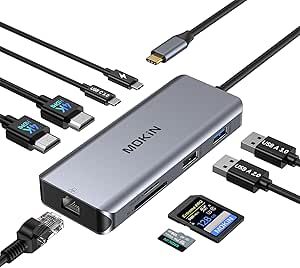
Choosing a Triple Display Docking Station: What the NOVOO 11-in-1 Reveals
The NOVOO 11-in-1 docking station promises extensive connectivity, including dual 4K HDMI and legacy VGA outputs, which is significant for multi-monitor setups. Buyers should understand that achieving triple displays often depends on your laptop's specific USB-C/Thunderbolt capabilities and the dock's internal display controller.
Key Considerations Before Buying
- Verify your laptop's USB-C port supports DisplayPort Alt Mode; not all USB-C ports can drive multiple external monitors, which is critical for the NOVOO's triple display feature.
- The 100W Power Delivery is essential for charging a laptop but ensure it matches your device's requirements, as some high-performance laptops may need more.
- The inclusion of both Gigabit Ethernet and VGA is a specific compromise, offering broad compatibility but indicating this dock may use older chipset technology for cost-effective multi-display support.
What Our Analysts Recommend
For docks like this, scrutinize user reviews mentioning specific laptop models (e.g., MacBook M1, Dell XPS) and their success with the advertised triple display feature. Genuine reviews will detail the exact resolution and refresh rate achieved on each connected monitor, not just state 'it works'.
Docking Stations Market Context
Market Overview
The market for multi-display USB-C docks is saturated with models boasting similar port counts, but real-world performance varies drastically based on the DisplayLink or MST hub chipset used, which often isn't advertised.
Common Issues
Common problems include inconsistent monitor recognition, overheating during sustained multi-display use, and power delivery that fluctuates or fails to charge the host device reliably, especially under full load.
Quality Indicators
Look for mentions of stable firmware, consistent performance across different operating systems (macOS vs. Windows), and build quality that manages heat dissipation, as these are hallmarks of a well-engineered dock beyond just port variety.
Review Authenticity Insights
Grade C Interpretation
A Grade C with a 22% estimated fake review rate suggests a notable portion of reviews may be inauthentic, potentially inflating the rating. The adjusted rating of 3.80/5, down from 4.22, is a more realistic benchmark of user satisfaction.
Trust Recommendation
Prioritize reviews that detail technical setup challenges, specific monitor models used, or mention driver installations for DisplayLink, as these are hallmarks of genuine experience. Be skeptical of overly vague 5-star reviews that lack this context.
Tips for Reading Reviews
Focus on 3 and 4-star reviews for balanced perspectives; they often reveal the specific conditions under which the dock succeeds or fails, such as 'triple display only works at 1080p with my HP laptop'.
Expert Perspective
The NOVOO dock's specification sheet is ambitious, particularly the dual 4K@60Hz HDMI plus VGA for triple displays. This typically requires either a high-bandwidth Thunderbolt connection or a DisplayLink chipset that relies on software drivers. The significant gap between the Amazon rating (4.22) and the adjusted rating (3.80) indicates real-world performance likely falls short of marketing claims for a meaningful subset of users. The high port variety, including SD/TF readers and Gigabit Ethernet, is a strong value proposition if the core display functionality works reliably with your specific hardware.
Purchase Considerations
Weigh the convenience of an all-in-one hub against the potential need for additional software drivers (like DisplayLink) and the possibility that your laptop may not support the full triple display output as advertised. This dock is best for users who need broad port compatibility and dual 4K, but who should verify their system's compatibility first.
Comparing Alternatives
Shoppers should compare the NOVOO's driver requirements and display limitations against docks from established brands like CalDigit or Plugable, which may offer more transparent compatibility lists.