
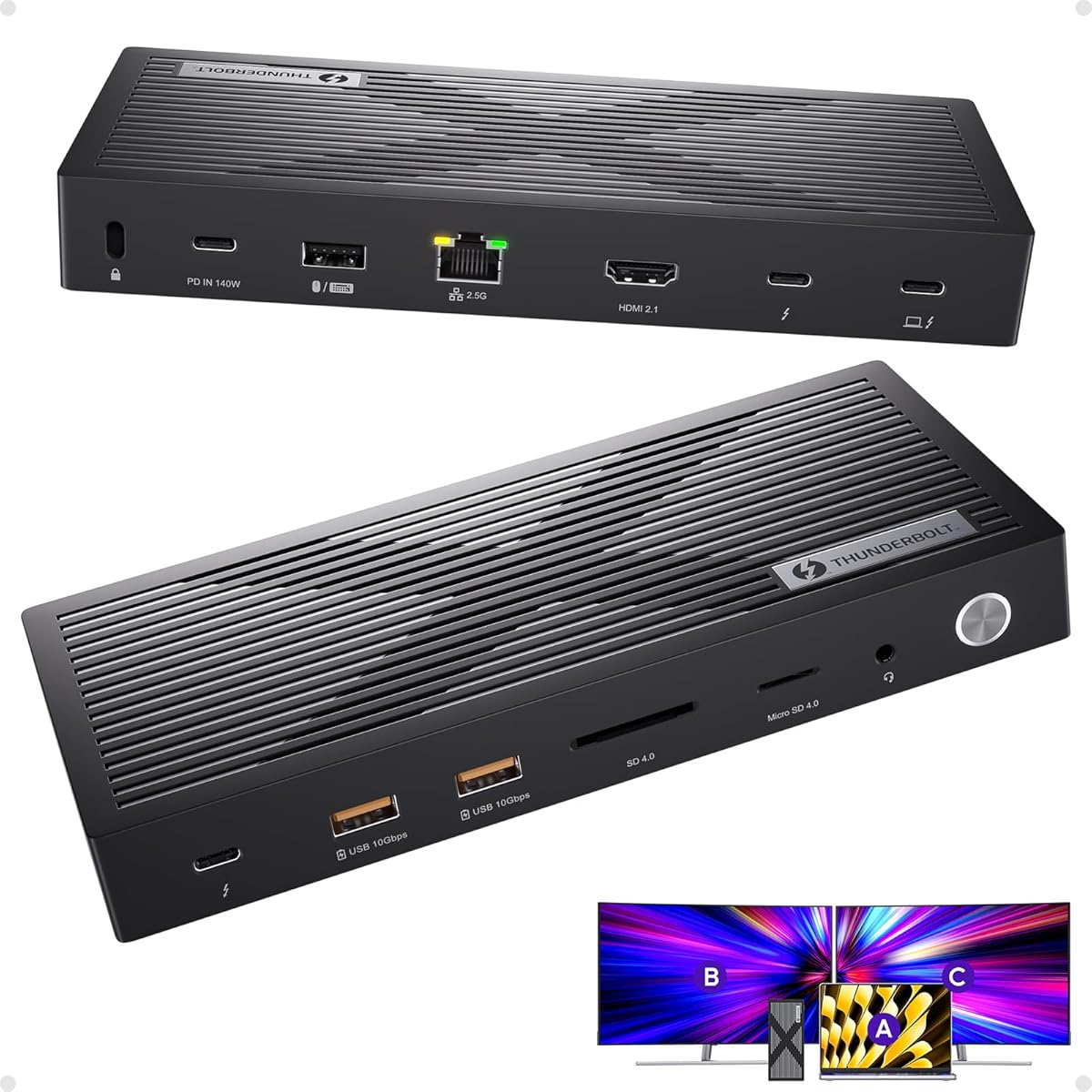
Choosing a Thunderbolt 4 Dock: What Mac M4 and Windows Users Must Verify
The PULWTOP Thunderbolt 4 Dock promises a high-bandwidth 40Gb/s connection for dual 8K/4K displays, but its true value lies in specific compatibility and power delivery. Buyers must scrutinize its certification claims and port configuration against their specific laptop model, especially the newer Mac M4 series it explicitly mentions. This isn't a generic USB-C hub; it's a premium connectivity solution demanding careful matching to your hardware.
Key Considerations Before Buying
- Verify Thunderbolt 4 host compatibility: This dock requires a laptop with a true Thunderbolt 4 (or USB4/Thunderbolt 3) port, not just USB-C, to achieve its advertised 40Gb/s speeds and dual 8K display support.
- Assess your power needs: Check if the dock's power delivery (PD) output matches your laptop's charging requirements, as insufficient wattage can lead to slow charging or battery drain under load.
- Confirm monitor protocol support: To drive dual 4K/8K displays, ensure your laptop's GPU and the dock's DisplayPort Alt Mode or MST capabilities align with your target resolutions and refresh rates.
What Our Analysts Recommend
Genuine Thunderbolt 4 certification should be verifiable, often with a specific certification ID. For docks like the PULWTOP, prioritize reviews that detail successful multi-monitor setups at high resolutions and note stable 2.5GbE Ethernet performance, as these are stress tests for the chipset and build quality. A lack of overheating or disconnection reports under full load is a key quality indicator.
Docking Stations Market Context
Market Overview
The Thunderbolt 4 docking station market is segmented between established brands with robust drivers and newer entrants like PULWTOP offering competitive specs at lower prices. The explicit mention of Mac M4/Pro/Max compatibility indicates a focus on the latest Apple Silicon, a battleground for dock manufacturers due to Apple's specific power and protocol requirements.
Common Issues
Common pitfalls include intermittent display flickering, especially with dual high-resolution monitors, and Ethernet or USB data dropouts when all ports are utilized simultaneously. Incompatibility with specific laptop models, despite Thunderbolt 4 being a standard, remains frequent due to firmware and power negotiation quirks.
Quality Indicators
Look for detailed user reports of stable, long-term use with multiple peripherals connected. Consistent mention of robust construction, minimal thermal throttling, and reliable wake-from-sleep functionality are strong signs. Certified docks should perform identically across compatible hosts; variability is a red flag.
Review Authenticity Insights
Grade B Interpretation
A Grade 'B' with an estimated 10% fake review rate suggests a generally trustworthy review pool where the majority of feedback is authentic. For a niche, technical product like this Thunderbolt 4 dock, a small percentage of inauthentic reviews is not uncommon, but the core user experiences are likely reliable.
Trust Recommendation
Focus on the verified purchase reviews that discuss technical setup specifics, like achieving dual 4K@60Hz or using the SD 4.0 card reader at full speed. Be slightly more skeptical of overly vague 5-star reviews that lack these technical details, as they may constitute the estimated 10% less authentic content.
Tips for Reading Reviews
For technical docks, prioritize reviews that mention the exact laptop model (e.g., 'MacBook Pro M4 Max') and monitor brands used. Reviews detailing firmware updates, specific cable types (Thunderbolt 4 vs. USB-C), and real-world bandwidth tests (like file transfer speeds to multiple SSDs) offer the most actionable insights.
Expert Perspective
The PULWTOP dock presents a compelling spec sheet for power users needing dual high-resolution displays and 2.5GbE networking. Its adjusted rating of 3.8/5 from a small but authentic review pool suggests it generally delivers on its core promises but may have minor inconsistencies or a steeper setup curve. The explicit targeting of the new Mac M4 architecture is a bold claim that requires validation from early adopters in the reviews. The inclusion of SD 4.0 and a 2.5GbE port indicates a design focused on creators and professionals, not just general office use.
Purchase Considerations
Weigh the cost savings against potential support and firmware update challenges from a less-established brand. If your workflow depends on the specific port combination (dual HDMI, SD 4.0, 2.5GbE) and you have a verified compatible host, this dock could be a fit. However, if broad compatibility and brand-backed reliability are paramount, caution is advised.
Comparing Alternatives
Shoppers should compare the PULWTOP's port selection, power delivery wattage, and warranty directly against certified docks from CalDigit, OWC, or Kensington before deciding.


