Cool Your NVMe SSD: Thermalright TR-M.2 2280 Heatsink Insights
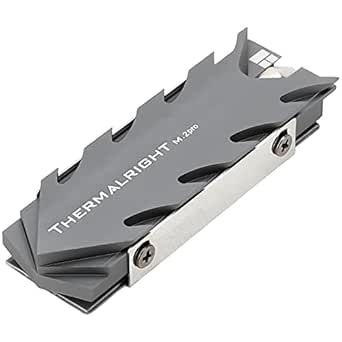
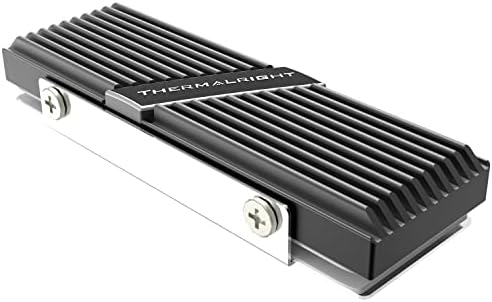
If you're pushing a high-performance M.2 2280 SSD in a desktop PC, thermal throttling can silently slash your speeds. The Thermalright TR-M.2 2280 is an aluminum heatsink with dual thermal conductivity pads, designed to draw heat away from your drive and keep it running at peak performance. Before buying, understand how this cooler fits your specific build and SSD model.
Key Considerations Before Buying
- Compatibility is crucial: This heatsink is designed for M.2 2280 form factor SSDs. Ensure your motherboard has clearance around the M.2 slot, especially if you have a GPU or other components nearby, as the heatsink adds height.
- Thermal pad thickness matters: The TR-M.2 2280 includes two thermal conductivity pads of varying thicknesses. Use the correct thickness to ensure proper contact between the SSD controller, NAND chips, and the aluminum heatsink for optimal heat transfer.
- Installation method: Unlike some heatsinks that use clips or screws, this model uses a simple clamp design. Check that the mounting mechanism is secure and doesn't put pressure on the SSD's components, which could damage the drive.
What Our Analysts Recommend
Look for heatsinks made from high-quality aluminum with a finned design to maximize surface area for heat dissipation. The thermal pads should be pre-cut or easily trimable to fit your SSD's specific chip layout. A low-profile design is beneficial for tight builds, but ensure it still provides adequate cooling for your drive's TDP.
Computer Heatsinks Market Context
Market Overview
The market for M.2 SSD heatsinks has grown rapidly as NVMe drives become faster and generate more heat, especially in desktops and gaming rigs. Prices range from simple aluminum slabs to elaborate copper-finned coolers, with the Thermalright TR-M.2 2280 sitting in the affordable, high-value segment.
Common Issues
Common problems include poor thermal pad contact due to incorrect thickness, heatsinks that are too tall for motherboard clearance, and designs that don't cover the controller chip. Some users also report adhesive thermal pads that leave residue or lose effectiveness over time.
Quality Indicators
Quality indicators include solid aluminum construction without sharp edges, thermal pads with high thermal conductivity (like the 2W/mK pads included here), and a secure mounting system that doesn't rely on flimsy clips. Positive reviews with specific temperature reduction data are a good sign.
Review Authenticity Insights
Grade B Interpretation
The Grade B authenticity rating and 10% estimated fake review rate suggest that while most reviews are genuine, a small portion may be incentivized or unreliable. This is typical for popular, moderately priced PC components and shouldn't be a dealbreaker, but it warrants cautious optimism.
Trust Recommendation
Trust the majority of verified purchase reviews, especially those detailing specific temperature drops (e.g., 'reduced my SSD temps by 15°C') or installation tips. Be skeptical of overly brief or vague five-star reviews, as they may be among the estimated 10% of fakes.
Tips for Reading Reviews
Focus on reviews that mention your specific SSD model or motherboard. Look for comments about installation ease, thermal pad thickness, and long-term performance. Photos of the installed heatsink can also help verify compatibility.
Expert Perspective
The Thermalright TR-M.2 2280 is a solid, no-frills heatsink that delivers effective cooling for most M.2 NVMe SSDs at a reasonable price. The high average rating of 4.89/5, even after adjusting for potential fakes to 4.60/5, indicates strong user satisfaction. Its dual thermal pads and aluminum construction are well-suited for desktop users looking to prevent thermal throttling during sustained read/write operations.
Purchase Considerations
Consider your specific SSD's power draw and your case's airflow—this passive cooler relies on ambient air movement. If you have a high-end Gen4 or Gen5 drive that runs exceptionally hot, you might need a more aggressive active cooling solution. Also, verify that your motherboard's M.2 slot has enough clearance for this heatsink's height.
Comparing Alternatives
Shoppers should compare this heatsink with other low-profile options from brands like EKWB or Sabrent, especially if they need compatibility with RGB lighting or have space constraints in a mini-ITX build.