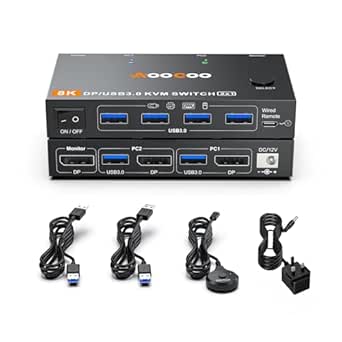
Dual Monitor KVM Buying Guide: Match Ports, Resolutions, and Cables
A dual-monitor KVM like the Avico lets you run two computers on two screens with one keyboard and mouse set, but compatibility hinges on matching your GPU outputs to the switch's HDMI 2.0 inputs. This model also adds USB 3.0 peripheral sharing and EDID emulation, two features that separate serious work-from-home gear from budget dongles.
Key Considerations Before Buying
- Confirm your computers can output two simultaneous video signals — many laptops with a single HDMI port will need a USB-C or DisplayPort adapter to feed both of the Avico's inputs. Without two independent outputs per machine, the dual-monitor switching simply won't function as intended.
- Check your target resolution and refresh rate against the switch's ceiling: 4K at 60Hz, 1440p at 144Hz, or 1080p at 240Hz. Gamers chasing high frame rates should note that 4K@120Hz or 1440p@240Hz are beyond this unit's HDMI 2.0 bandwidth.
- EDID emulation is the quiet hero here — it keeps Windows and macOS convinced a monitor is always attached, preventing the window reshuffling and black-screen delays that plague cheaper KVMs when you switch between machines.
What Our Analysts Recommend
Prioritise HDMI 2.0 (not 1.4) if you need 4K@60Hz or 1440p@144Hz, and verify USB 3.0 rather than USB 2.0 for fast external drives and webcams. Also budget for certified HDMI 2.0 or better cables on every connection, since a single sub-spec cable will silently cap your refresh rate.
KVM Switches Market Context
Market Overview
The KVM switch market has split into budget USB 2.0 units that choke on high-refresh displays and premium Thunderbolt/USB-C docks that cost several times more. HDMI 2.0 dual-monitor switches with USB 3.0 sit in the practical middle — enough bandwidth for 1440p gaming and 4K productivity without Thunderbolt pricing.
Common Issues
The most frequent complaints in this category are flickering or dropped displays caused by inadequate cables, hotkey switching that fails to register, and USB peripherals disconnecting mid-transfer. Mac users in particular report wake-from-sleep problems when EDID emulation is absent or poorly implemented.
Quality Indicators
Look for explicitly stated EDID emulation, HDMI 2.0 certification, and USB 3.0 (5Gbps) rather than vague 'USB 3.0 compatible' claims. A clear hotkey scheme, physical selector button, and included cabling are signs the manufacturer expects real-world use rather than a spec-sheet sale.
Review Authenticity Insights
Grade A Interpretation
A Grade A authenticity rating with an estimated 5% fake review rate is about as clean as Amazon data gets — the adjusted 4.90/5 barely moves from the raw 5.00/5 across 37 reviews. All reviews being verified purchases, with reviewers describing specific setups like work-from-home dual-laptop arrangements, further supports genuine usage.
Trust Recommendation
You can treat the 5-star consensus as broadly credible, but with only 37 reviews the sample is small — read the full text of several reviews to see whether their setups resemble yours. Pay closest attention to reviewers who mention their exact GPU, laptop model, or monitor resolution, as those are hardest to fabricate.
Tips for Reading Reviews
For KVM switches, filter reviews for mentions of your operating system and display setup, since compatibility is the main failure point. Watch for repeated complaints about the same issue (e.g., a specific hotkey or cable) — patterns across multiple verified reviewers carry more weight than any single glowing or scathing review.
Expert Perspective
The Avico Dual Monitor KVM targets a genuinely underserved niche: two computers, two monitors, high refresh rates, and USB 3.0 sharing at a non-Thunderbolt price. Its EDID emulation and Mac M-series compatibility claims address the two biggest pain points in this category, and the near-perfect verified-review record suggests it delivers on those promises for most buyers. The 4K@60Hz ceiling is the main limitation for future-proofing, but for 1440p@144Hz gaming or dual-1080p workstations it's well matched.
Purchase Considerations
Weigh whether your current and near-future displays exceed HDMI 2.0 bandwidth — if you're planning 4K@120Hz or 1440p@240Hz monitors, this switch will bottleneck them. Also count your USB peripherals: USB 3.0 sharing is a real upgrade, but if you need more than the provided ports, factor in a powered hub.
Comparing Alternatives
Compare against USB-C/Thunderbolt dock-style KVMs if you need higher refresh rates or single-cable laptop docking, and against DisplayPort 1.4 switches if your monitors favour DP inputs.